


What is an ATS resume?
An ATS resume is a resume formatted specifically for applicant tracking systems — the software almost every mid-size and large employer uses to screen applications before a recruiter sees them. To pass an ATS in 2026, use a single-column layout, standard section headings (Summary, Experience, Skills), exact-match keywords from the job description, and avoid tables, text boxes, headers/footers, and graphics.
An ATS resume is a resume formatted specifically to be parsed by applicant tracking systems — the software nearly every mid-size and large employer uses to screen applications before a recruiter ever sees them. The University of Illinois Chicago Career Services walks through exactly how an ATS reads your resume — including the formatting choices that cause parsers to drop or misread sections of your work history. If your resume isn’t built to pass that filter, the strength of your experience doesn’t matter enough — the document may never reach a human reviewer.
This piece explains what an ATS actually does, how 2026 AI screening changed the game, and exactly how to format and optimize your resume to survive both. It also covers where human resume expertise still wins over AI-generated output — because that gap is getting bigger in 2026, not smaller. For readers ready to hand the problem to a specialist, our dedicated ATS resume service rebuilds resumes specifically for Workday, Greenhouse, and Lever parsing.

How ATS Software Actually Works
An Applicant Tracking System (ATS) is a software tool companies use to manage the hiring process and screen resumes more efficiently. Fortune 500 companies and many others rely on resume scanners to filter thousands of resumes, ensuring only the most qualified candidates reach a hiring manager.
An ATS does three things with your resume after you upload it. We break down how tracking software parses an application in a separate technical piece; the summary:
1. Parsing
The ATS reads your file and extracts structured data: name, contact info, work history (company, title, dates), education, and skills. Modern parsers from platforms like Workday, Greenhouse, Lever, iCIMS, BambooHR, and Taleo combine rule-based extraction with machine learning.
2. Matching
The parsed data is compared against the job description. The system looks for keyword overlap — specific skills, tools, certifications, and phrases the recruiter or hiring manager flagged as important.
3. Scoring or Ranking
Candidates are ordered by match strength. Recruiters typically review the top 20–50 resumes from the queue. Anyone ranked below that line rarely gets a human look.
Think of it as a librarian who speaks only in exact phrases. If the job description says “project management” and your resume says “managed projects,” some ATS platforms match the two — and some don’t. Workday tends to be more permissive; older systems are strict about exact-string matching.
Without an ATS-friendly resume that uses clear section headings, bullet points, and the right job titles, job seekers risk being overlooked during the job search. The safest move is to mirror the job description’s language in at least two places on your resume. By tailoring your job application to how an ATS scans resumes, you boost your chances of standing out, getting noticed, and moving closer to an interview.
What Changed in 2026: AI Screening on Top of ATS
In 2025 and 2026, most large employers layered AI screening on top of their existing ATS. Platforms like HireVue, Paradox, Eightfold, and Pymetrics now analyze parsed resume data against richer models — not just keyword match, but inferred fit, career trajectory, and language patterns.
Three things changed for job seekers:
- Keyword stuffing got harder to fake. Older ATS systems rewarded raw keyword density. AI screeners are better at detecting when keywords don’t match the surrounding context — for example, listing “machine learning” as a skill with no supporting work history.
- Career trajectory matters more. AI models look at the shape of your career — promotion velocity, role progression, industry consistency — and score accordingly. Harvard Business Review’s reporting on algorithmic hiring flags this as both a feature and a fairness concern.
- Generative-AI output is flagged. Some enterprise ATS platforms now run resume text through AI-output detectors. Resumes that read as obviously ChatGPT-generated — same phrasing, same structure, same three adjectives — get downranked.
None of this means AI is fully in charge. Recruiters still review the final shortlist. The first gate is more technical and more nuanced than it was two years ago.
ATS Resume Formatting Rules: What to Do and Avoid
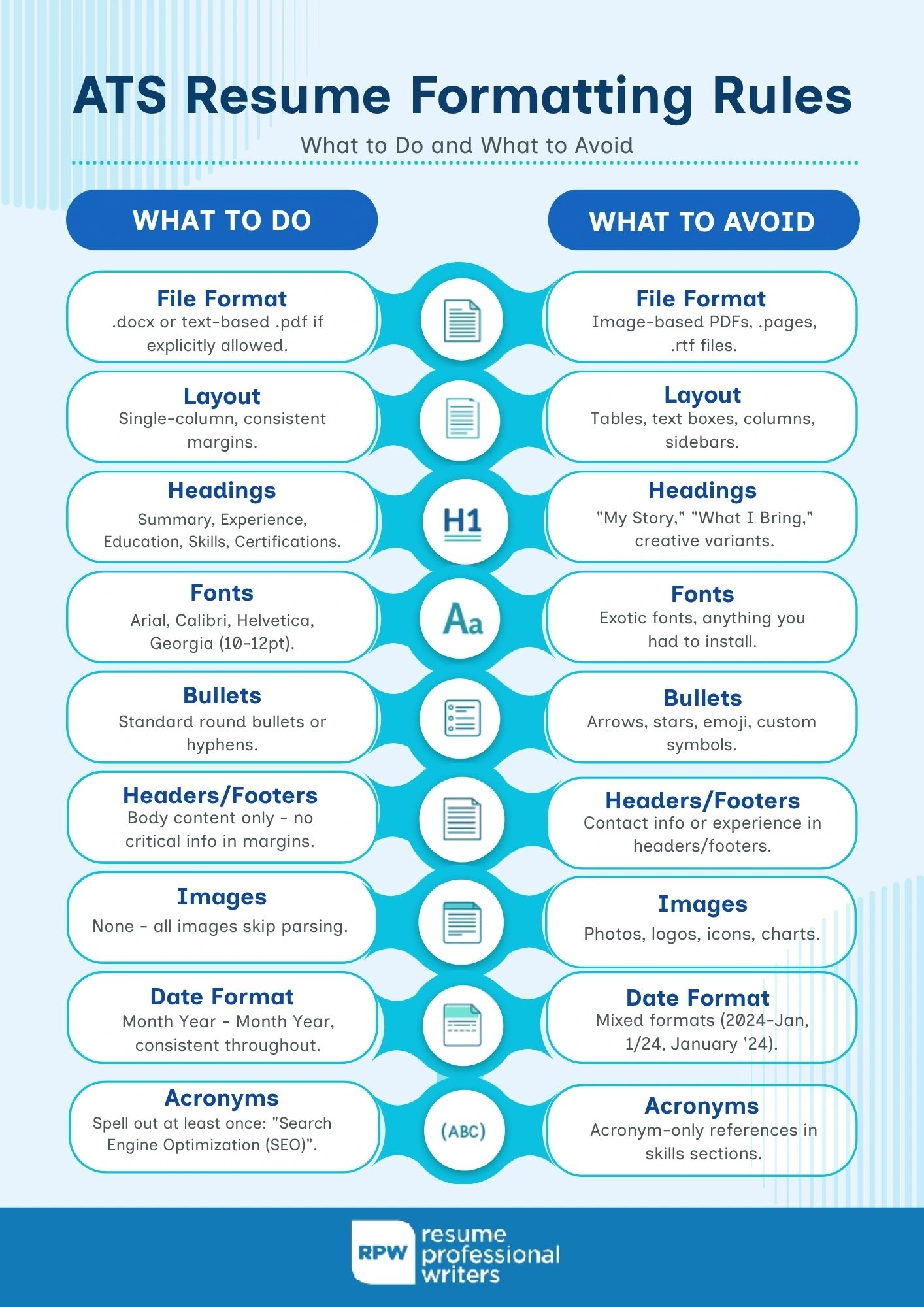
ATS parsers fail in predictable ways. Follow these rules and your resume will survive nearly every major system.
Do:
- Save as `.docx` or, if the employer explicitly allows it, a text-based `.pdf`.
- Use standard section headings: Summary, Experience, Education, Skills, Certifications. Skip clever variations (“My Story,” “What I Bring”) — parsers look for exact matches.
- Use a simple, single-column layout with consistent formatting throughout — our resume layout walkthrough covers spacing, margins, and section order in detail.
- Use standard fonts: Arial, Calibri, Helvetica, Georgia, Times New Roman — 10–12-point body. (For technical roles, our take on the best resume fonts explains why screen-rendering matters more than print fidelity.)
- Spell out acronyms at least once (“Search Engine Optimization (SEO)”) so the ATS catches both forms.
- Use a consistent date format throughout: Month Year – Month Year.
Avoid:
- Tables, text boxes, columns, or graphics. Parsers frequently drop content inside these containers entirely.
- Headers and footers. Many ATS systems ignore them, so anything important (including contact info) can disappear.
- Images, logos, or photographs of yourself. These trigger parse errors in most systems and aren’t relevant anyway.
- Exotic fonts or any font you had to install. If it’s not on a standard Windows or Mac machine, it probably won’t render.
- Special characters as bullets (arrows, stars, emoji). Use standard round bullets or hyphens.
- Anything in a sidebar. Sidebars almost always break parsing.
ATS Keyword Strategy: Mirror the Job Description
The single biggest move you can make for your ATS score is mirroring the job description’s language in the right places. Not all keyword use is equal — location on the page matters.
Here’s how to approach it:
1. Read the job description twice. Circle every hard skill, tool, certification, and phrase that appears more than once. Those are your priority keywords.
2. Put the top 5–8 keywords in your skills section verbatim. This is the fastest-parsing section in almost every ATS.
3. Weave the same keywords into your work experience bullets naturally. If the role emphasizes “stakeholder management,” use that exact phrase in at least one bullet — not just “worked with stakeholders.”
4. Don’t stuff. Keywords crammed in white text, hidden in footers, or repeated ten times in a row will get flagged by modern AI screeners. Aim for natural density.
If you want starter lists by role, we maintain keyword lists organized by industry for the most common positions.
ATS Myths That Will Cost You Interviews (Including the Famous One)
Four pieces of ATS advice circulate online that are wrong or actively harmful in 2026. The first one is the most cited stat in our whole industry — and it’s not what you think.
“75% of resumes get rejected by ATS before a human sees them.”
This stat appears everywhere. It traces to a defunct 2013 startup called Preptel that never published a methodology, and no peer-reviewed study supports the figure. What’s verifiable is that a significant share of resumes scores poorly on ATS match — Jobscan’s pipeline data suggests roughly half of unoptimized resumes fall below a 50% match score on a given job description. That’s a real problem, but it’s not the same thing as automatic rejection.
What actually happens: low-match resumes land at the bottom of the recruiter queue and rarely get reviewed in time. The fix is the same either way — mirror the job description’s keywords — but we should stop citing a stat whose source doesn’t exist.
“Add white keywords to game the ATS.”
Typing keywords in white text so humans can’t see them used to work on some old systems. It doesn’t anymore — modern parsers strip formatting before scoring, and AI screeners flag the anomaly. Some platforms auto-reject resumes containing invisible text.
“Use an ATS-compatible template with fancy graphics.”
Most “ATS-friendly” templates sold online still use sidebars, icons, or multi-column layouts. If it’s not a single-column Word doc with standard headings, it’s not truly safe. The flip side of this is that a generic resume — single-column but no tailoring — still won’t perform; format-safe and content-tailored have to come together.
“Your resume will be rejected for one missing keyword.”
Not true. ATS scoring is cumulative — no single keyword is a kill. What hurts you is missing all the priority keywords, not missing one.
What Happens After Your Resume Passes the ATS
Clearing the ATS gets you into the recruiter’s shortlist. At that point, the same resume has to work for a human — usually in a 7-to-10 second scan. This is where ATS-optimized resumes sometimes fail: they pass the software but read as robotic to the human reviewer.
The fix is balance. Keep the structure parser-friendly (single column, standard headings, plain formatting) and write the content like a human would: specific accomplishments, real numbers, plain language. Don’t sacrifice readability for ATS optimization — you need both. Our piece on optimizing every section for ATS walks through the balance section by section, and our resume format examples show what each format style looks like in practice on a parseable layout.
Free Tools to Test Your ATS Resume Readiness
To increase your chances of getting past the ATS and in front of a hiring manager, it’s essential to use the right tools and resources. Here are some ATS resume templates and checkers.
Before you submit, run your resume through one or two tools:
- Free ATS-Resume Checker by Resume Professional Writers: This free online tool is a top choice for job seekers looking to ensure their resumes are ATS-compatible. It provides a detailed review of your resume, identifying potential issues and offering actionable suggestions to improve performance. With its user-friendly interface and expert insights, this tool helps you optimize your resume to pass ATS screenings and stand out to recruiters.
Jobscan: A popular ATS resume checker, it compares your resume against a specific job description, generates a match score, and helps optimize keyword usage and formatting.
ResumeWorded: This tool uses AI to analyze your resume for ATS compatibility, offering actionable insights and suggestions to enhance performance.
SkillSyncer: It performs keyword gap analysis against a target job posting and highlights missing skills and terms.
Enhancv ATS Check: It focuses on formatting and parseability to ensure your resume can be read correctly by ATS systems.
These tools aren’t perfect — each uses its own scoring algorithm, and no tool sees the actual ATS your target company uses. Running through two different ones gives you a fair sense of whether your resume is parser-ready. You can also run your resume through our free check for a second read.

Get an ATS-Ready Resume Built for 2026 Hiring
If testing shows your resume is struggling — or if you’re applying to senior or competitive roles where every point of ATS score matters — it’s usually worth bringing in someone who specializes in ATS optimization.
Our team understands how Workday, Greenhouse, Lever, and other major platforms parse resumes, and we build every document to clear the software while reading well for the human reviewer on the other side. If your current resume isn’t getting interviews, let our team rebuild it for ATS and human readers alike — no pressure, no obligation.
Frequently Asked Questions
What does ATS mean on a resume?
ATS stands for Applicant Tracking System. It’s the software employers use to collect, scan, and rank resumes before a recruiter reviews them. When someone says “make your resume ATS-friendly,” they mean formatting it so the software can accurately parse your information and match it to the job description. Nearly all mid-size and large U.S. employers use one.
How do I know if my resume is ATS-friendly?
Run it through a free tool like Jobscan or Resume Worded, which will flag parsing issues and keyword gaps. You can also do a quick visual check: single column, standard section headings, no tables or text boxes, no images, standard fonts. If your resume passes that visual test and parses cleanly in the tools, it’s probably safe for most ATS platforms.
What is a good ATS score?
Most ATS-scoring tools recommend aiming for 75% or higher against a specific job description. A score above 80% means your resume closely mirrors the language of the posting, which usually correlates with a strong chance of reaching the recruiter. Scores below 60% indicate significant keyword gaps or formatting problems.
Can AI detect if my resume was written by ChatGPT?
Some enterprise ATS platforms and AI screening tools do run resume text through AI-output detectors. Overly generic phrasing — “results-driven,” “passionate team player,” “strategic thinker” — is a known fingerprint. If you use AI to draft your resume, treat it as a starting point: rewrite the summary and top bullets in your own voice, and include specific numbers and details that AI-generated text typically lacks.
Should I use a PDF or Word document for an ATS?
Use `.docx` whenever possible — it’s the safest format for ATS parsing. Text-based PDFs work in most modern systems but occasionally fail in older ones. Never use image-based or scanned PDFs; they can’t be parsed at all. If the application portal lets you choose, `.docx` is the default right answer.