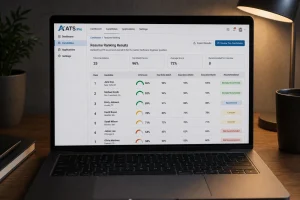


The right resume format does something subtle but powerful: it presents your strengths in the order a recruiter most wants to see them, while staying readable to the software that screens it first. The wrong format can bury your best experience or, worse, confuse the applicant tracking system and get you filtered out.
There are four best resume formats, and the best one depends on your career stage and goals. This guide breaks down each format with examples, shows the pros and cons, and helps you choose — plus the formatting rules that keep any format ATS-friendly in 2026.

The Four Resume Formats at a Glance
Almost every resume uses one of four structures:
- Chronological (Reverse-Chronological): Lists work experience from most recent to oldest. The standard, recruiter-preferred choice.
- Functional (Skills-based): Leads with skills and groups accomplishments by theme, downplaying the timeline.
- Targeted (Role-specific): Presents career path and skills that are relevant to your target job.
- Combination (Hybrid): Blends a strong skills section with a reverse-chronological work history.
Each suits a different situation. The sections below show when to use each, with an example structure for all four.
Chronological Resume Format
The chronological format is the default for good reason: recruiters scan it quickly, and applicant tracking systems parse it reliably. It puts your work history front and center, newest first. The Professional Association of Résumé Writers & Career Coaches affirms that the chronological format remains the most recruiter‑preferred and ATS‑compatible structure, making it the safest choice for most job seekers.
Structure
Contact information
Qualifications Summary/Profile
Skills (Core Competencies/Areas of Expertise)
Professional/Work Experience (most recent first)
Education
Professional Development or Activities (if applicable)
Best For
Anyone with a steady, relevant work history — which is most candidates. If your most recent roles support the job you want, this is your format.
Pros and Cons
- Pro: Familiar to recruiters, ATS-friendly, and it highlights career progression.
- Con: It exposes employment gaps and makes career changes more obvious, since the timeline is front and center.
Functional Resume Format
The functional format leads with skills and accomplishments grouped by theme, pushing the work-history timeline down or minimizing it.
Structure
Contact Information
Qualifications Summary/Profile
Skills grouped by category, with duties and accomplishments under each
Brief work history (titles, companies, dates only)
Education
Professional Development or Activities (if applicable)
Best For
Career changers, people with significant employment gaps, or those whose strongest qualifications aren’t tied to their most recent role.
Pros and Cons
- Pro: It foregrounds transferable skills and softens timeline issues.
- Con: Recruiters are often wary of it because it can hide gaps, and some ATS struggle to parse a skills-first structure. Use it deliberately, not as a default.
Targeted Resume Format
The targeted format is all about customization: every section is tailored to match a specific job description. Instead of presenting your full career history, it highlights the skills, experiences, and achievements most relevant to the role you’re pursuing.
Structure
Contact information
Qualifications Summary/Profile
Skills (Core competencies/Areas of Expertise)
Relevant Experience
Other Experience
Education
Professional Development or Activities (if applicable)
Best For
Candidates applying to a clearly defined role where alignment with the posted requirements is critical. Ideal if you want to show hiring managers you’re not just qualified—you’re the right fit for this job.
Pros and Cons
- Pro: Highly tailored, keyword‑rich, and recruiter‑friendly. It makes it easy for hiring managers and ATS systems to see you match the role.
- Con: Time‑intensive to create, since each version must be customized. It may also omit broader career details that aren’t directly relevant.
Combination Resume Format
The combination (hybrid) format pairs a substantial skills section with a full reverse-chronological work history — getting much of the functional format’s benefit without the recruiter skepticism.
Structure
Contact information
Qualifications Summary/Profile
Skills (detailed, with brief proof points)
Work History (most recent first, with quantified bullets)
Education
Professional Development or Activities (if applicable)
Best For
Experienced professionals with a strong, relevant skill set, candidates targeting a specific role, and people making a moderate pivot who still have relevant recent experience.
Pros and Cons
- Pro: Showcases skills and a solid track record, and it’s flexible.
- Con: It can run long, so it requires tight editing to stay focused and scannable.
How to Choose the Right Format
Match the format to your situation, not to a trend. A few quick rules:
- Steady, relevant history → chronological. It’s the safest, most ATS-friendly choice.
- Career change or gaps, with strong transferable skills → combination is usually safer than functional.
- Skills clearly outweigh a thin or unrelated timeline → functional, used carefully.
- When in doubt → chronological or combination. Both parse well and reassure recruiters.
Whatever you choose, the format only works if it’s readable to the software screening it — which brings us to the formatting rules.
Keep Any Format ATS-Friendly
Format choice and ATS-friendliness are different things, and you need both. Whichever structure you pick, follow these rules so it parses cleanly:
- Single-column layout — multi-column designs scramble in many parsers.
- Standard section headings — “Professional Experience,” “Core Competencies,” “Education.”
- Common fonts at 10–12pt, no decorative typefaces.
- No tables, text boxes, or graphics holding key information.
- Contact details in the body, never in the header or footer.
For the full set of rules, see our guide on ATS-friendly resume format.
Resume Format Examples Side by Side
Seeing the same candidate in each format makes the differences concrete. Imagine a marketing professional with five years of experience and one short gap.
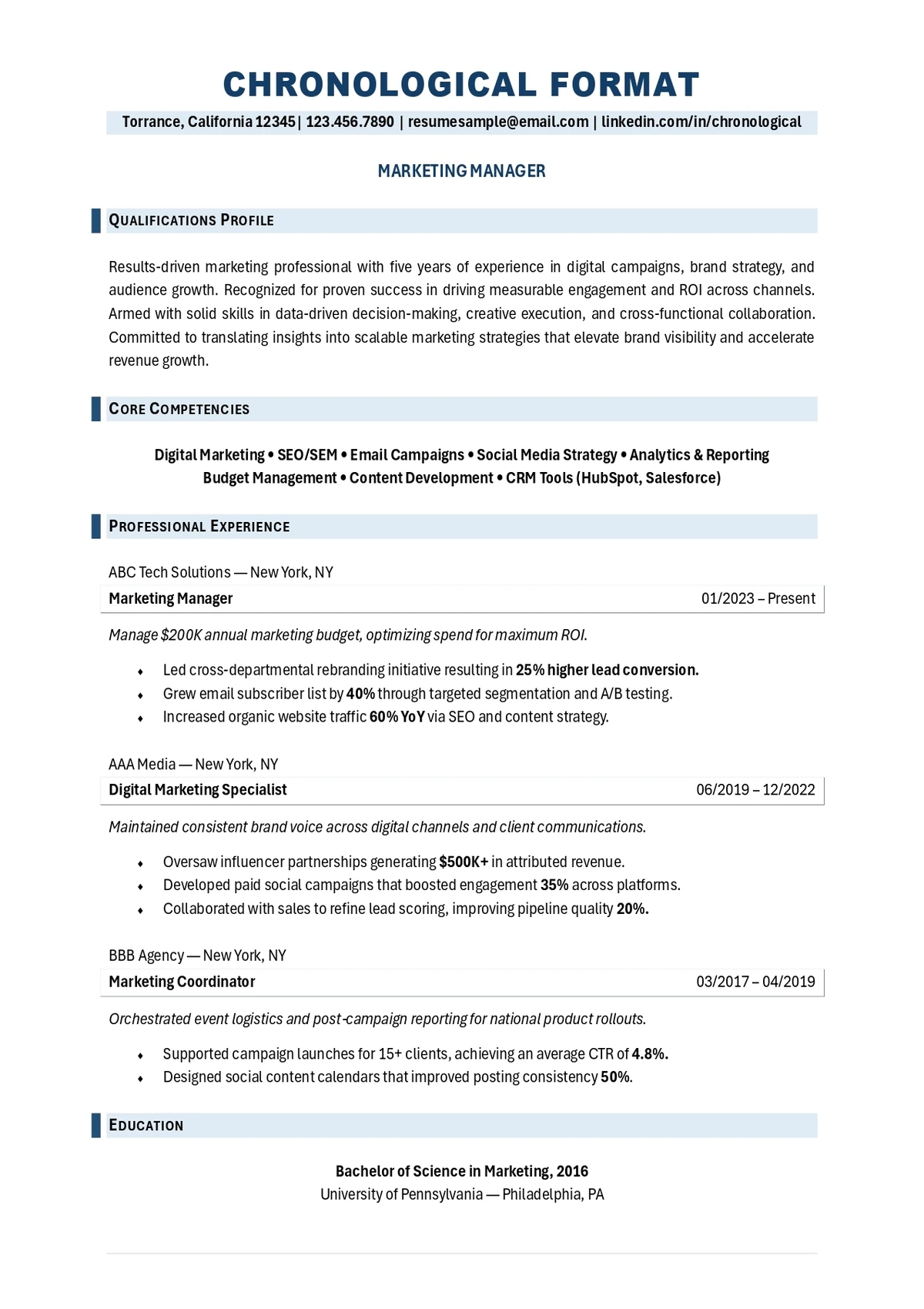
Chronological
Opens with a summary, then a skills line, then each marketing role newest-first with quantified bullets (“grew email list 40%,” “managed $200K budget”), then education. The reader follows a clean career arc. The one gap is visible but minor against a strong, recent track record.
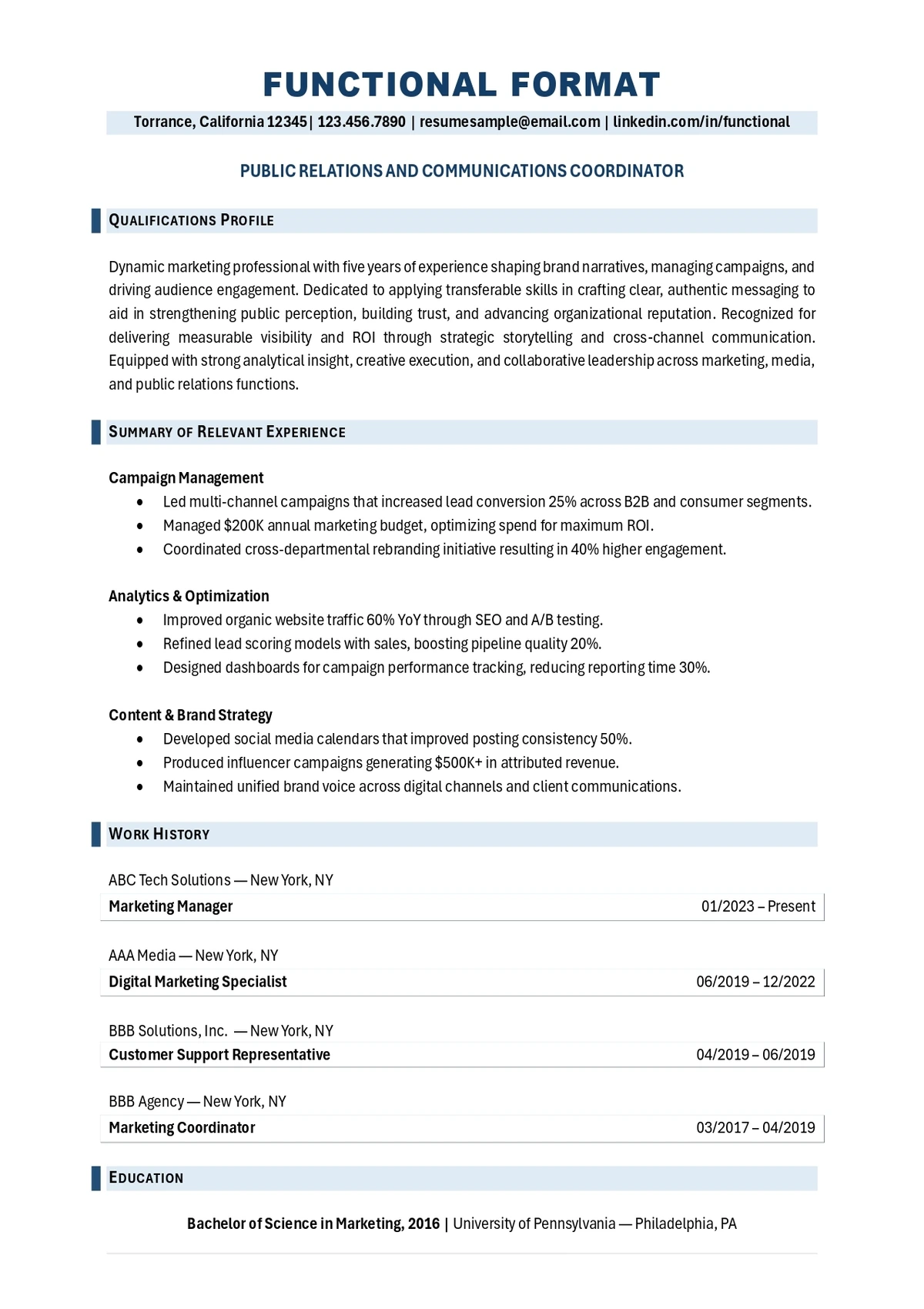
Functional
Opens with a summary, then groups accomplishments under skill themes — “Campaign Management,” “Analytics,” “Content” — each with bullet proof points, followed by a bare list of titles and dates. Skills lead; the timeline recedes. Useful if the recent role were unrelated, but a recruiter may wonder what the thin work-history section is hiding.
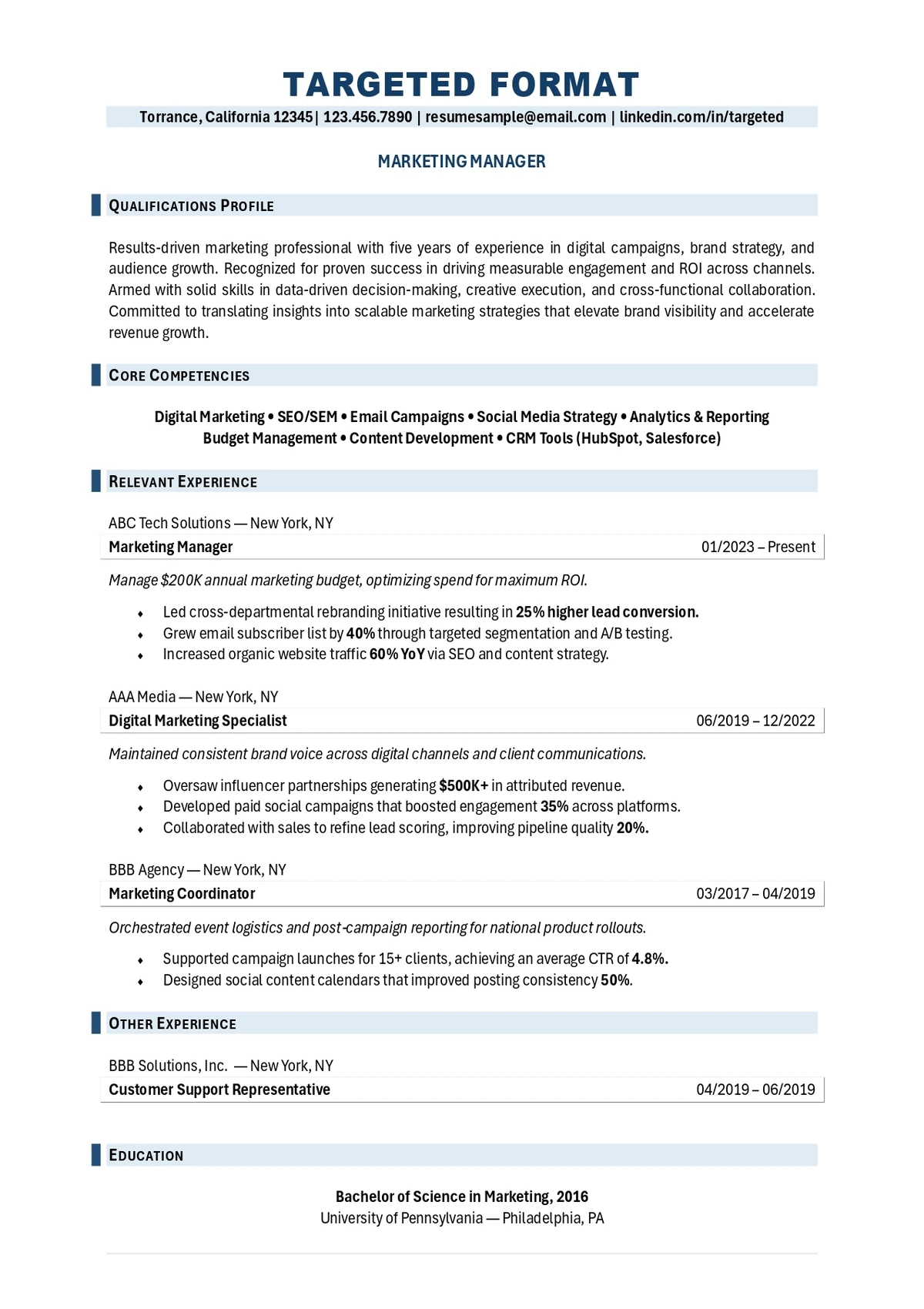
Targeted
Opens with a qualifications profile and core competencies section, then highlights only the roles, projects, and skills most relevant to the target job. Less‑related experience is minimized or downplayed. The reader sees a resume that feels custom‑built for one posting, with keywords aligned to the job description.
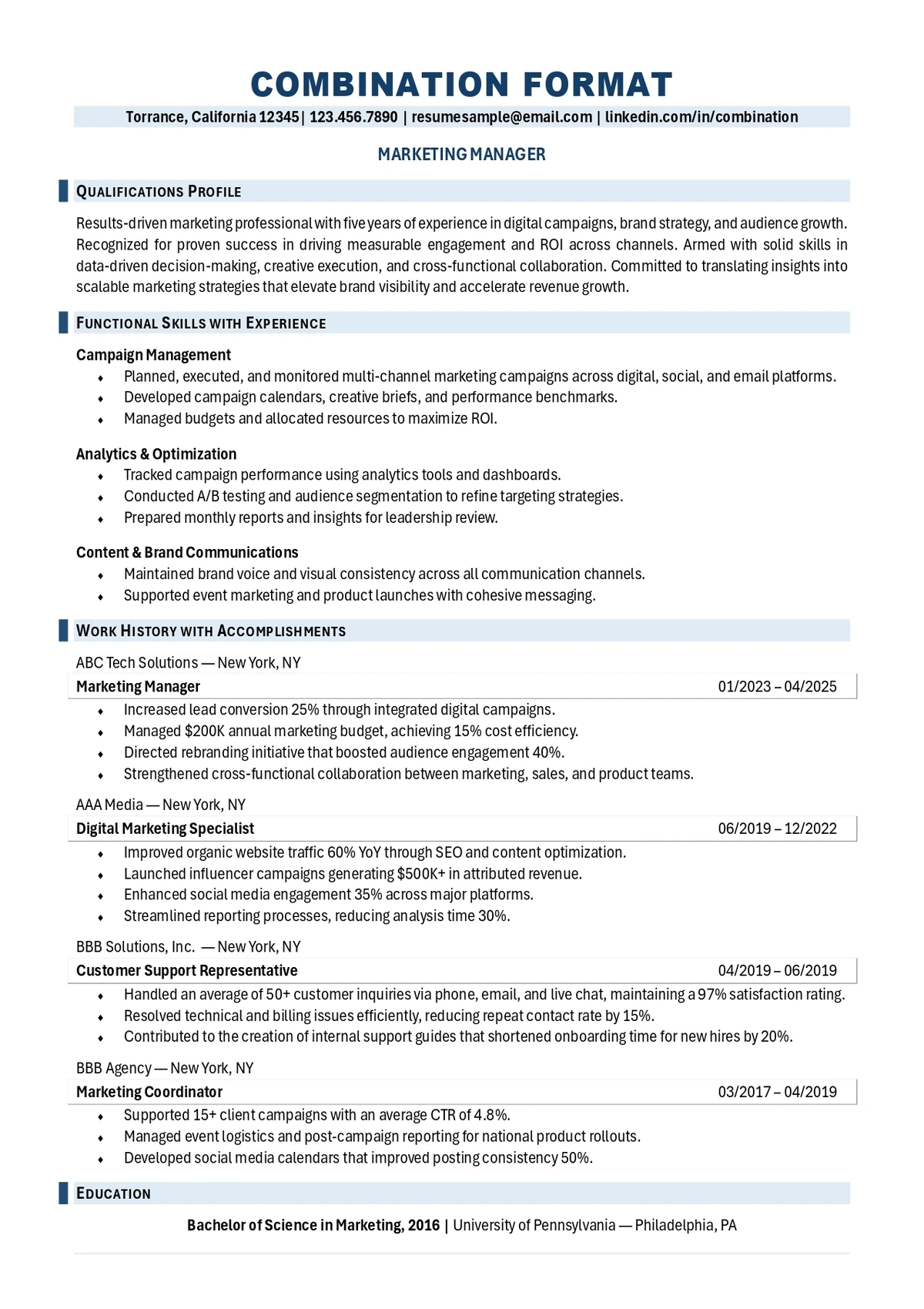
Combination
Opens with a summary and a detailed skills section with brief proof points, then a full reverse-chronological work history with quantified bullets. The reader sees both the skill set and the track record. For this candidate, who is returning after a gap, the combination format is the strongest — it leads with capability while still proving it with a real history.
Resume Format by Career Stage
Your career stage is often the fastest way to land on the right format.
1. Students and New Graduates
A Chronological format works, but lead with education, projects, and internships since work history is limited. Keep it to one page.
2. Mid-career Professionals
Chronological or Targeted. If your recent roles align with the target job, chronological is clean and effective.
3. Senior and Executive Candidates
Chronological or Combination format, leading with a strong summary and core competencies, then a results-focused history. Two pages is acceptable.
4. Career Changers
Functional format to foreground transferable skills while still showing real experience.
5. Returning after a Gap
Combination or Chronological, with the gap addressed briefly; avoid a purely functional layout that signals you’re hiding something.
Common Resume Format Mistakes
Even the right format fails if it’s executed poorly. Watch for these.
- Choosing functional to hide a gap. Recruiters recognize the pattern; a combination format handles gaps more credibly.
- Multi-column designs that break ATS parsing, no matter how attractive they look.
- Inconsistent formatting — mismatched fonts, spacing, or bullet styles — which signals carelessness.
- Cramming to fit. If content overflows, edit it down rather than shrinking margins and fonts to unreadable sizes.
- Burying the summary and skills below a long history, so recruiters miss your fit in the first scan.
Pick the format that presents your strengths first, then execute it cleanly and consistently. A clear summary at the top helps every format — our resume summary template shows how to write one.
Format vs. Design vs. Template: What People Mix Up
“Resume format” gets used to mean three different things, and confusing them leads to bad choices. It’s worth separating them before you decide.
- Format is the structure — how your information is organized and in what order. That’s the chronological, functional, targeted, and combination distinction this guide covers, and it’s the choice that affects how recruiters and ATS read your experience.
- Design is the visual styling — fonts, colors, spacing, and layout. Good design improves readability, but heavy design (columns, color blocks, graphics) can break ATS parsing. Keep design clean and in service of the format, not competing with it.
- Template is a pre-built file you fill in. Templates can be a helpful starting point, but many popular ones use multi-column or table-based layouts that look polished and parse badly. If you start from a template, confirm it’s single-column and ATS-friendly before trusting it.
The takeaway: decide your format first based on your situation, keep the design clean and parseable, and only then worry about which template, if any, to start from.
Why Format Matters Even More With ATS Screening
A decade ago, resume format was mostly about recruiter preference. Today it’s also about machine readability, which raises the stakes on getting it right. The vast majority of applications pass through an applicant tracking system that parses your resume into structured data before any person sees it.
That changes how to think about the four formats. A chronological resume isn’t just recruiter-friendly — its predictable, dated structure is exactly what parsers expect, which is part of why it remains the safest choice. A functional resume’s skills-first structure, by contrast, can confuse some parsers that look for clear dated roles, compounding the recruiter skepticism it already faces.
This is the practical reason the combination format has become so popular: it gives you a prominent skills section for human readers while keeping the dated, reverse-chronological history that software parses cleanly. You get the best of both worlds, provided you keep the layout single-column and standard. Whatever you choose, remember that format and ATS-friendliness work together — the structure positions your strengths, and clean formatting makes sure the software can actually read them.
Pick the Right Resume Format That Gets Interviews

Format is a strategic choice, not just a style one — the right structure puts your strongest qualifications exactly where a recruiter looks first, while staying readable to the software in between. The wrong one quietly works against you.
Resume Professional Writers has helped more than 100,000 job seekers choose the right format and build resumes that perform with both ATS systems and hiring managers. Explore our resume writing services to have your resume formatted and written by a professional.
Frequently Asked Questions
What is the best resume format in 2026?
For most people, the chronological format — it’s recruiter-preferred and parses reliably through applicant tracking systems. The combination format is a strong alternative when you want to emphasize skills alongside a solid work history.
Is a functional resume bad?
Not bad, but use it carefully. Recruiters can be skeptical of skills-first resumes because they can hide gaps, and some ATS struggle to parse them. A combination format usually achieves the same goal more safely.
Which resume format is best for a career change?
A functional format typically works best. It foregrounds transferable skills while still showing a real work history, which reassures recruiters more than a purely chronological layout.
Does resume format affect ATS parsing?
Yes. Beyond the format type, the formatting choices matter most — single column, standard headings, no tables or graphics for key text. A clean structure parses well regardless of which of the four formats you choose.
How long should my resume be?
One page for early-career candidates and two pages for those with extensive relevant experience. Choose a format that lets you stay within that range without cramming.