

The industry field is one of the smallest settings on your LinkedIn profile, a single dropdown, and one of the most overlooked. Yet recruiters filter by it, LinkedIn uses it to rank you in search, and the wrong choice can quietly keep you out of results you should be in.
This guide explains exactly what the “industry” field is, how it differs from your job title, how to pick the option that gets you found, and how to change it in the current LinkedIn interface. By the end, you will know whether your profile is set to what the industry recruiters are actually searching for.

What the Industry on LinkedIn Actually Is
Industry on LinkedIn is a single category that describes the sector you work in, not your specific role. LinkedIn maintains a fixed list of several hundred standardized industries, from “Software Development” to “Hospitals and Health Care” to “Retail.” You choose one, and only one, from that list.
It is a structured data field, which is what makes it powerful. Because every profile uses the same standardized values, recruiters can filter millions of users down to a single sector in one click. Your free-text headline cannot be filtered that way; your industry can.
Industry vs. Job Title: The Difference That Trips People Up
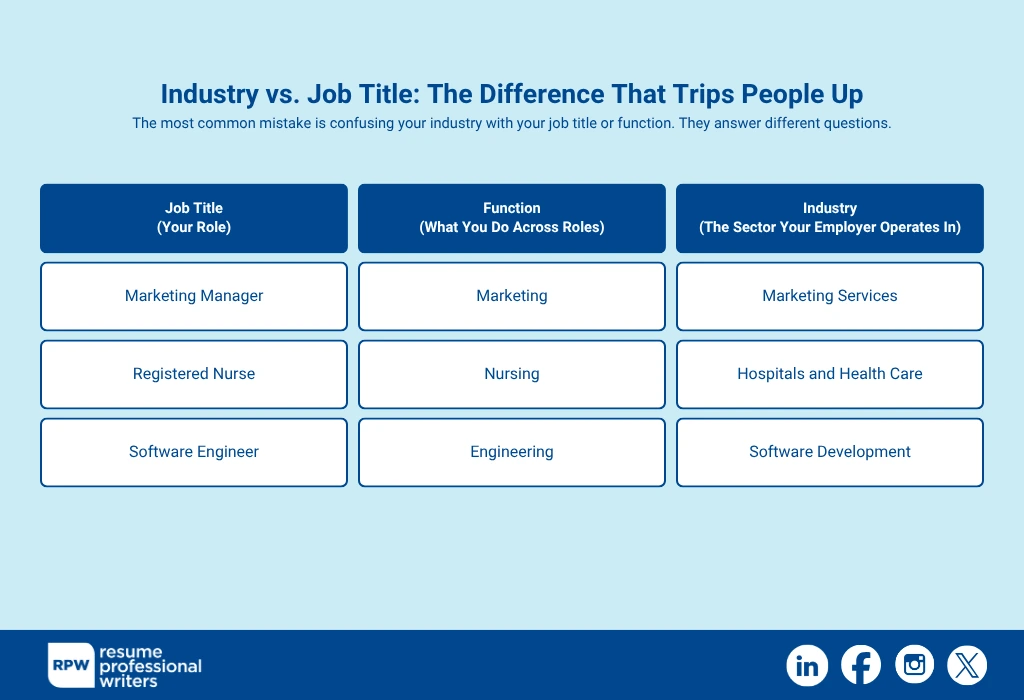
The most common mistake is confusing your industry with your job title or function. They answer different questions.
- Job title is your role: “Marketing Manager,” “Registered Nurse,” and “Software
Engineer.”
- Function is what you do across roles: marketing, nursing, and engineering.
- Industry is the sector your employer operates in: “Marketing Services,” “Hospitals
and Health Care,” and “Software Development.”
A marketing manager at a hospital and a marketing manager at a software company share a job title but sit in different industries. Which industry you select tells LinkedIn, and every recruiter searching it, which world you belong to. Choose the one that matches the jobs you want, not necessarily the one on your current paycheck.
Why the Industry on LinkedIn Matters More Than It Looks
When building a profile, the Industry on LinkedIn is more than a dropdown; it’s a strategic signal. It shapes how recruiters discover you, how algorithms recommend opportunities, and how peers in your chosen field connect with you. Selecting the right industry on LinkedIn early helps align your visibility, brand, and career trajectory with your goals.
1. Recruiters filter by it directly
In LinkedIn Recruiter and even in the free search, “Industry” is a standard filter. If a tech recruiter narrows their search to “Software Development” and your profile says, “Information Services,” you simply will not appear, no matter how strong your experience is.
2. It shapes LinkedIn’s recommendations
LinkedIn uses your industry to suggest jobs, people, groups, and content. Set it accurately, and your feed and job recommendations get sharper. Set it wrong, and LinkedIn steers you toward the wrong opportunities.
A precise selection facilitates connections with peers, potential collaborators, and thought leaders within your specific area of expertise, helping you build a network that actually aligns with your career goals.
3. It feeds search relevance
When someone searches a keyword, LinkedIn weighs profile signals, including industry, to decide who ranks. An aligned industry on LinkedIn reinforces that you are a genuine match for sector-specific searches.
How to Choose the Right Industry on LinkedIn
With several hundred options, the right pick is not always obvious. Use these rules.

1. Align with your career aspirations
Match the jobs you want, not just your current employer. If you are a developer at a bank but want tech roles, “Software Development” may serve you better than “Banking.”
2. Pick the most specific accurate option
Look for the narrowest industry category that truly fits your path. LinkedIn has split broad categories into narrower ones — choose “Hospitals and Health Care” over a vague “Wellness and Fitness” if it fits.
3. Think like a recruiter
Search the industry filter the way recruiters would. See which option surfaces the professionals you want to be grouped with, and select the one that positions you in the right talent pool.
4. Check peers and target companies
Review profiles of people in your desired roles and note the industry they’ve chosen. Aligning with that group helps you appear alongside them and strengthens your visibility to the right employers.
When two industries both fit, choose the one used by the employers you are targeting. Your goal is to land in the same bucket recruiters search.
How to Change Your Industry on LinkedIn (2026)
Updating the field takes under a minute. In the current interface:
- Go to your profile and click the pencil/edit icon in your intro section (the top card with your name and headline).
- Scroll to the “Industry” field within the edit panel.
- Start typing your sector and select the closest standardized match from the dropdown. You cannot enter free text; you must pick from LinkedIn’s list.
- Click Save. The change applies immediately and updates how you appear in search and recommendations.
Note that the industry field is set at the profile level, not per job. It reflects your overall professional identity, so choose based on the direction you are heading.
Common Industry Field Mistakes
Even a strong LinkedIn profile can be undermined by mislabeling your industry. Recruiters, algorithms, and peers rely on this field to filter and connect. Choosing carelessly can bury your profile in the wrong searches and weaken your professional brand.
- Leaving it on a default or outdated value. If you switched sectors and never updated it, you are being filtered into your old world.
- Choosing by job function instead of sector. “Marketing” is a function; the industry is the sector your company sits in.
- Picking an overly broad category when a specific one exists. Specific industries match more targeted recruiter searches.
- Optimizing for your current employer instead of your goal. If you are job hunting, align with the industry of the roles you want next.
With your Industry field set correctly, the next step is to enhance the rest of your LinkedIn profile by aligning its content with your chosen industry.
How Industry Works with the Rest of Your Profile
The industry field is one signal among several. It performs best when the rest of your profile reinforces the same direction.
1. Headline
Use sector and role keywords a recruiter would search, since the headline carries heavy search weight.
2. About
State your specialty and the kind of work you want, echoing the industry you selected.
3. Experience
Make sure recent roles and skills line up with the industry, so the profile reads as coherent.
4. Skills
List the hard skills that define your target sector, the same ones you would put on your resume.
If you are also refreshing your resume alongside your profile, our guides on how to put LinkedIn on your resume and what skills to put on a resume keep both documents aligned.

Popular LinkedIn Industries and What They Cover
LinkedIn’s list has grown more granular over the years. Here are widely used categories and the kinds of roles that fit them, to help you map your work to the right value.
Technology
Industries like “Software Development,” “IT Services and IT Consulting,” “Computer and Network Security,” and “Technology, Information and Internet” cover most tech roles. Developers and product teams usually fit with “Software Development,” while consultants and managed-service staff fit “IT Services and IT Consulting.”
Healthcare
“Hospitals and Health Care” is the broad catch-all for clinical roles. More specialized paths, such as “Pharmaceutical Manufacturing,” “Medical Equipment Manufacturing,” and “Mental Health Care,” allow professionals to position themselves with greater precision.
Finance and Business
Where finance used to be lumped together, LinkedIn now distinguishes “Financial Services,” “Banking,” “Accounting,” and “Insurance.” Choose the one that matches the employers you want, since recruiters in each search their own bucket.
Marketing and Media
“Marketing Services,” “Advertising Services,” “Public Relations and Communications Services,” and “Technology, Information and Media” cover most creative and growth roles.
Education
“Education,” “Higher Education,” “Primary and Secondary Education,” and “E-Learning Providers” let teachers, administrators, and instructional designers position themselves precisely.
Choosing an Industry as a Student or Career Changer
If you do not have a clear sector yet, set the field toward where you are heading rather than leaving it blank or generic.
- Students and New Graduates: Choose the industry of the field you are studying for and want to enter, not a part-time job in food service or retail.
- Career Changers: Align the field to your target sector once your profile shows relevant training, projects, or certifications that support the move.
- Freelancers and Consultants: Pick the industry your clients operate in, or the service category that best matches the work you want more of.
- Returning to Work After a Gap: Set it to the sector you are re-entering so recruiters in that space can find you again.
How Recruiters Actually Use the Industry Filter
Understanding the recruiter side makes the right choice obvious. When a recruiter opens LinkedIn Recruiter or runs a search, the industry filter is one of the first ways they shrink a massive candidate pool to a manageable shortlist.
A typical sourcing search combines three filters: a job title or keyword, a location, and an industry. If a fintech recruiter searches for “Backend Engineer” in “Financial Services,” a strong backend engineer whose profile is set to “Information Services” is invisible to that search. The filter excludes them before any human reads a word.
This is why aligning to your target sector beats defaulting to your literal employer. A few practical implications:
- Recruiters rarely search every industry at once; they pick the one or two that match the role, so being in the wrong bucket is costly.
- Agency and in-house recruiters often save industry-specific searches and get alerted to new matches. An aligned profile can surface you automatically over time.
- Boolean and filter searches reward consistency. When your headline, skills, and industry on LinkedIn all point at the same sector, you rank higher within the filtered set.
Think of the industry field as the door you are standing behind. Recruiters open one door at a time. Make sure you are behind the one they will open for the jobs you want.

Make Your Whole LinkedIn Profile Work as Hard as Your Industry Field
The industry dropdown gets you into the right search results, but it is the Headline, About, and Experience sections that convince a recruiter to reach out. Each element needs to point in the same direction and use the language recruiters actually search.
Resume Professional Writers has helped more than 100,000 professionals present themselves clearly across resumes and LinkedIn. Explore our LinkedIn profile writing service to have your profile optimized end to end, so the right people find you and the right opportunities follow.
Frequently Asked Questions
Can I select more than one industry on LinkedIn?
No. LinkedIn allows only one industry per profile. Choose the single sector that best matches the roles you are targeting.
Does changing my industry notify my network?
No. Updating the industry field is a quiet change and does not post an update or notify your connections, unlike adding a new job.
What if my industry is not on the list?
You must choose from LinkedIn’s standardized list — free text is not allowed. Pick the closest standardized match; recruiters search those same standardized values, so an approximate fit is still better than a poor one.
Should job seekers set their industry to their target field?
In most cases, yes. If you are actively changing sectors, aligning your industry to where you want to go helps the right recruiters find you, as long as your experience supports the move.
How often should I update my industry?
Revisit it whenever you change sectors or shift your job-search focus. Otherwise, it can stay fixed — it is identity-level, not role-level.