


Overloading a LinkedIn profile with duplicate or outdated resumes weakens a candidate’s professional image. When multiple versions compete for attention, recruiters struggle to identify the most accurate career story, creating confusion and reducing credibility. Streamlining uploaded materials ensures that every document reflects a clear, consistent narrative aligned with current goals.
This guide explains how to remove additional resumes from LinkedIn and keep a profile recruiter‑ready. With simple steps for both desktop and mobile, it shows how to eliminate clutter while offering practical tips for managing future uploads. The result is a polished, consistent presence optimized for visibility in competitive job markets.

Understanding LinkedIn Resume Management
LinkedIn’s “Easy Apply” feature makes job applications faster by storing uploaded resumes for future use. Yet over time, these files can accumulate—especially when candidates update or test different formats. The result is often a cluttered profile filled with outdated versions that confuse recruiters and weaken professional credibility.
By 2026, LinkedIn allows up to ten resume versions per account. While this flexibility helps candidates tailor applications for different roles, it also increases the risk of submitting the wrong file. A healthcare professional, for example, may prepare resumes for both hospital and insurance positions but accidentally send an outdated version if older files remain stored.
Regular maintenance and removal of older resume become essential to avoid errors and keep a career narrative sharp. Here are other reasons to remove additional resumes from LinkedIn:
- Clarity for Recruiters: A single, updated resume ensures hiring managers see the most accurate career story and current representation of one’s skills. Employers appreciate profiles that reflect current, coherent information that reinforces the narrative introduced in uploaded resumes.
- Brand Consistency: Aligning resumes with the LinkedIn profile strengthens candidate’s credibility and professional image. Maintaining this synergy contributes directly to enhanced visibility in both recruiter searches and algorithm-driven recommendations.
- Algorithm Efficiency: LinkedIn’s algorithms prioritize user engagement and application history. Having fewer, updated files optimizes system processing when a candidate uses “Easy Apply,” reducing potential submission errors.
- Professional Polish: Effective resume management on LinkedIn represents a broader personal image-branding strategy that mirrors attention to detail, digital fluency, and professional presentation.
Removing outdated resumes is more than technical housekeeping—it’s a strategic branding move. By keeping only relevant, well‑crafted versions, candidates present a cohesive narrative that enhances visibility in recruiter searches and algorithm‑driven recommendations.
Step-by-Step Instructions to Remove Additional Resumes from LinkedIn
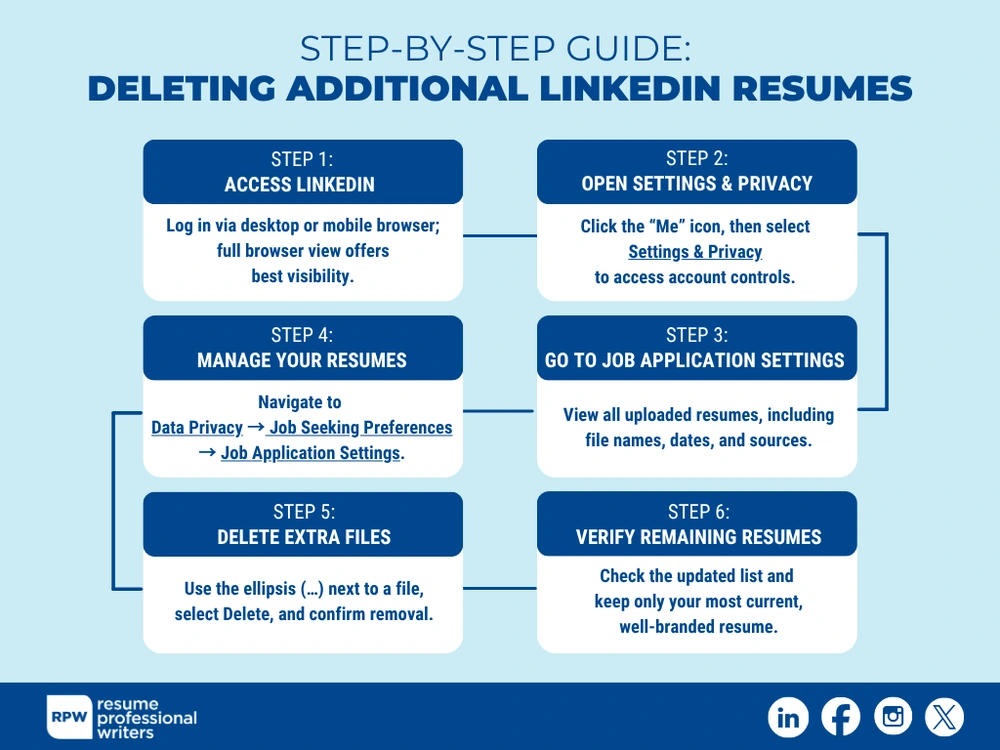
Eliminating unnecessary resumes from LinkedIn requires navigating the platform carefully, whether on desktop or mobile. Although LinkedIn continues to refine its interface, many users overlook where stored documents reside. Follow these steps to manage or delete resumes securely:
1. Access LinkedIn via desktop or mobile browser.
Log in to your LinkedIn accounts using your preferred device. While the platform is accessible on both desktop and mobile, using a full browser version—preferably Google Chrome or Microsoft Edge—provides better visibility of file management settings.
2. Navigate to “Me” and select “Settings & Privacy.”
Once logged in, click on the “Me” icon located in the top navigation bar. Under the drop-down menu, choose “Settings & Privacy” to access the main configuration dashboard for account preferences, privacy controls, and stored application data.
3. Locate “Job application settings.”
Within the left navigation pane, select “Data privacy” or “Job seeking preferences.” From there, click on “Job application settings.” This section holds information about uploaded resumes, stored response templates, and previous job submissions.
4. View uploaded resumes under “Manage your resumes.”
Scrolling to this subsection reveals the list of all resume files uploaded for previous “Easy Apply” jobs. Each entry includes a document name, upload date, and the source device used. Review file details carefully to identify which resumes are outdated or redundant.
5. Delete additional or obsolete resumes.
To remove a resume, click on the ellipsis (…) icon next to the file name, then select “Delete.” LinkedIn will prompt confirmation before permanently erasing the document. After deletion, the system immediately updates the available resume list to reflect current uploads only.
6. Verify remaining files.
After completing deletion, review the remaining resume list to ensure proper retention of only active and well-branded documents. Ideally, keep one primary resume version to prevent misalignment when applying through different listings.
Expert Tip
Aside from executing these steps, rename your final document with clear identifiers—such as “Firstname_Lastname_Resume_2026”—to reinforce professionalism. This naming practice aligns with recruiters’ expectations when reviewing multiple submissions within applicant tracking systems (ATS).
Best Practices for LinkedIn Resume Maintenance
Beyond simple deletion, resume management on LinkedIn involves preventive steps that ensure sustained profile quality. A disorganized approach to resume storage can undermine even the most well-crafted professional timeline. Proactive optimization enables job seekers to maintain career credibility in every application they submit through LinkedIn or other integrated job boards.
Limit uploaded resumes to one or two targeted versions.
Maintaining a main format and one specialized variation—such as industry-specific or federal-compliant versions—keeps the file system organized and effective for different job targets.
Update resumes semi-annually.
Most professionals benefit from scheduling biannual content updates to reflect new achievements or technical skills. Updating removes obsolete roles while showcasing ongoing development consistent with a dynamic LinkedIn profile.
Integrate LinkedIn optimization strategies.
A cohesive online brand enhances visibility. Incorporating metrics, accomplishments, and leadership keywords shared between the LinkedIn “Experience” section and uploaded resume creates stronger hiring alignment.
Retitle files consistently.
Files labeled with clear descriptors improve searchability. Recruiters scanning submissions through LinkedIn Recruiter benefit from seeing concise document titles that directly communicate recent updates.
Ensure ATS readability.
Even though LinkedIn accepts various file types, resumes saved as clean, non-graphic PDFs ensure compatibility across ATS scanning systems. Removing decorative templates prevents parsing issues during application processing.
Developing these maintenance habits reinforces personal branding strength and digital discipline. As job markets evolve and LinkedIn algorithms continue prioritizing engagement-ready content, streamlined document storage helps professionals project efficiency. Organized resumes also reassure recruiters that candidates maintain structured, modern job search habits backed by deliberate communication choices.

Why Removing Extra Resumes Matters for Recruiter Perception
Recruiter impressions form within seconds of reviewing a LinkedIn profile or job application. Duplicate or outdated resumes can signal disorganization and weaken trust, while a single updated document reinforces reliability and accuracy. Alignment between a resume and a LinkedIn profile establishes brand consistency—the foundation of professional credibility
Professionals across industries—healthcare, engineering, federal contracting, digital marketing—benefit from demonstrating precision in how their documents are presented. That precision directly influences recruiter impressions and overall career branding.
- Leadership Credibility: A clean, well‑managed resume repository signals organization, strategic thinking, and integrity. Recruiters perceive candidates as competent leaders who demonstrate the attention to detail expected in executive roles.
- Attention to Detail and Accuracy: One updated resume signals reliability and attention to detail. Recruiters interpret streamlined document management as attentiveness to detail, reducing doubts about accuracy and minimizing the risk of mismatched credentials.
- Coherent Professional Identity: When resumes align seamlessly with LinkedIn profiles, recruiters see a coherent professional identity. This consistency strengthens trust and increases the likelihood of outreach and interview opportunities.
- ATS Optimization: Recruiters rely on keyword matching and algorithmic ranking. Consistent resumes without conflicting job titles or education details are perceived as polished and credible, improving visibility in applicant tracking systems.
Troubleshooting Common LinkedIn Resume Deletion Issues

Some users encounter difficulties while attempting to remove additional resumes from LinkedIn. Technical glitches, cached profiles, or version mismatches often contribute to confusion. Understanding these scenarios helps job seekers prevent unnecessary frustration and ensures a smoother cleanup process.
- Synchronization delays. LinkedIn’s servers may take several minutes to fully update after deletion, particularly when accessed from multiple devices. Refreshing the browser or logging out and back in typically resolves the issue.
- Mobile app limitations. Certain functions, such as complete file deletion, are not always accessible via the mobile application. Performing resume management through a browser interface guarantees access to all current features.
- Browser cache conflicts. Cached versions may cause deleted files to appear temporarily visible. Clearing browser cache and cookies remedies this visual inconsistency.
- Outdated resume not linked to Easy Apply. In rare cases, resumes uploaded directly to third-party applications through LinkedIn integration (rather than “Easy Apply”) might not appear under “Job Application Settings.” Re-uploading a replacement document usually refreshes the repository.
- System maintenance updates. When LinkedIn undergoes background updates, deletion options may temporarily disappear. Revisiting after a few hours typically restores functionality.
Should visual or functional issues persist, LinkedIn Help Center’s “Data and Job Applications” support section remains the appropriate escalation route. Submitting specific feedback, including the browser used and upload timestamps, helps the support team quickly identify storage conflicts. Technical persistence often pays off; once cleared, candidates regain smooth document management capability that directly improves their daily job search experience.
Optimizing LinkedIn After Removing Additional Resumes
After successfully removing extra resumes, professionals should use the opportunity to refresh their broader LinkedIn presence. Integration between a modernized resume and an optimized profile creates uniform branding that appeals to both automated recruitment tools and real-world decision-makers. Strengthening these connections ensures that applicants appear strategic, credible, and consistent across all career touchpoints.
| Action | Purpose |
|---|---|
| Update headline and “About” section with current keywords | Improves discoverability and keyword matching in recruiter searches. |
| Refresh “Experience” section accomplishments | Aligns content with the metrics presented in the most recent resume version. |
| Add featured media or portfolio samples | Visually enhances professional credibility, especially for creative or technical roles. |
| Adjust public profile visibility settings | Ensures the new resume remains accessible only to intended recruiters. |
| Enable “Open to Work” settings selectively | Optimizes privacy while targeting active job openings relevant to updated credentials. |
Consistent profile synchronization sustains momentum in the competitive 2026 job market. As hiring relies more heavily on LinkedIn automation and AI-driven screening, even small updates influence ranking on the recruiter dashboard. Profile completeness now factors directly into LinkedIn’s internal “Profile Strength” indicator, which increases visibility when fully optimized. Regularly aligning resume deletions, updates, and profile refreshes ensures maximal algorithmic advantage.
Strategic Resume Branding for Future LinkedIn Applications
Once job seekers remove additional resumes from LinkedIn, the remaining document becomes the foundation for future applications. Strategic resume branding goes beyond design or visual presentation; it combines Precision, measurable achievements, and keyword alignment with employer expectations, ensuring recruiters and algorithms recognize the candidate’s value.
- Keyword Alignment: Resumes that mirror LinkedIn profile data and integrate tailored phrases from target job descriptions improve algorithmic relevancy scores and consistently outperform those built on aesthetics alone.
- Quantifiable Achievements: Replace vague adjectives with measurable results, especially in high‑demand fields like IT, healthcare, and finance. Recruiters favor concise, action‑driven bullet points paired with clear outcomes, which often serve as differentiators in shortlisted applications.
- Precision and Narrative Flow: Ensure resumes echo the core LinkedIn profile details to reinforce brand consistency and credibility. In addition to accuracy, error‑free formatting and smooth, action‑oriented narrative signal professionalism and build trust with recruiters.
LinkedIn’s built‑in tools, such as Search Appearances and Profile Views, provide measurable indicators of optimization success. Tracking these metrics allows candidates to refine resume language, keyword placement, and overall branding strategy.
A single optimized resume transforms LinkedIn from a simple profile into a curated career hub. This streamlined approach showcases intent, control, and strategic precision, positioning candidates for stronger recruiter engagement and higher visibility.

Set the Stage for New Opportunities with A Streamlined Profile
Maintaining one accurate, keyword-rich resume enhances digital professionalism while ensuring that hiring teams engage with the version that best communicates an applicant’s value. Removing outdated or duplicated resumes from LinkedIn directly supports a consistent, trustworthy personal brand that aligns with the expectations of modern employers. For job seekers ready to optimize career branding further, many partner with ATS-ready resume writing experts who refine both content and format to meet evolving hiring standards.
Frequently Asked Questions
Where are resumes stored on LinkedIn?
Resumes used for the “Easy Apply” feature are stored within the account’s “Job Application Settings” under the Data Privacy tab. Job seekers can view, download, or delete them from this same section using a desktop browser.
Can multiple resumes be uploaded to LinkedIn?
LinkedIn allows up to ten resumes to be stored simultaneously, but managing fewer ensures better clarity. Keeping one or two targeted versions prevents recruiters from accessing outdated materials that might conflict with current information.
Does deleting a resume affect past job applications?
Removing a resume from LinkedIn storage does not retract already-submitted applications. Employers retain copies submitted during the “Easy Apply” process, so deleting a file only affects future submissions.
Is it possible to delete resumes via the LinkedIn mobile app?
LinkedIn’s mobile app features limited functionality for resume management. Complete deletion typically requires accessing the “Job Application Settings” page via a desktop browser, ensuring precise file control.
Should resumes and LinkedIn profiles have identical content?
While exact wording is unnecessary, both should communicate the same achievements and career direction. Consistency between profile and resume enhances credibility and improves recruiter engagement metrics, leading to more targeted outreach.